
Time Tagger Software Release v2.22 - 10 GbE Streaming up to 300 MTags/s and Enhanced Time Tagger Lab Workflow
by Maré Sutphen | on 29 June 2026
Software v2.22 introduces three key upgrades to Time Tagger. Time Tagger X users can now stream up to 300 MTags/s directly to their PC via 10 Gbit Ethernet, while retaining full Time Tagger Lab and API access. The update also adds multi-measurement charting in Time Tagger Lab for easy channel comparison, as well as a new automatic data-saving feature that streamlines sequential and repeating measurement workflows.
Time Tagger Software v2.22 introduces high-rate, real-time time-tag streaming for the Time Tagger X over the SFP+ interface, supporting up to 300 MTags/s via 10 Gigabit Ethernet, a 3x higher throughput than USB 3.0 streaming. The new release also improves the everyday measurement workflow in Time Tagger Lab with synchronized multi-measurement charting and automatic data saving.
What’s New?
1. Stream up to 300 MTags/s directly to the PC through the SFP+ interface on the Time Tagger X
Time Tagger X users can now stream time tags directly to a host PC through the SFP+ port using a 10 Gbit Ethernet connection. This enables supported streaming rates up to 300 MTags/s while preserving access to Time Tagger Lab and the Time Tagger API, whereas previously users could achieve a data transfer rate of more than 90 MTags/s only by using an external FPGA, thereby losing access to the powerful Time Tagger API.
This increased data transfer rate will be invaluable to anyone currently limited by USB 3.0 bandwidth, particularly when using a large number of input channels or recording high-repetition-rate lasers or fast oscillators.
Streaming speeds depend on your system’s processor and memory bandwidth, as well as the measurement types you are running, with 300 MTags/s being the upper limit. See our in-depth guide for full details on optimizing your setup.
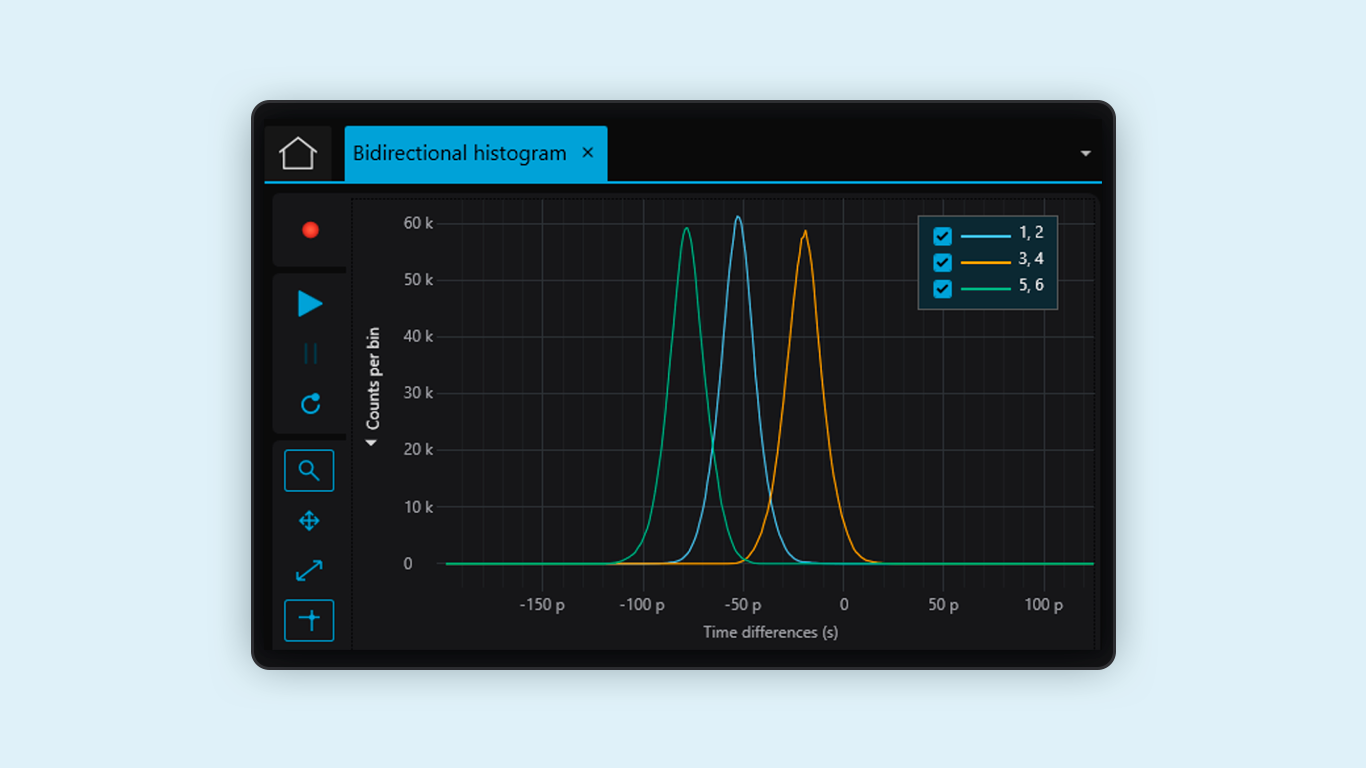
2. Compare synchronized measurements on one chart in Time Tagger Lab
Users can now display multiple synchronized measurements of the same type on a single chart in Time Tagger Lab. In particular, this enables direct comparison of channel pairs, detector responses, and timing offsets across any number of combinations of input channels for our many time histogram measurement classes (Correlation, StartStop, Histogram, HistogramLogBins).
By leveraging our SynchronizedMeasurements functionality, the software ensures that all measurements process the exact same time tags, and it includes full support for exporting multiple measurement data to a file.
3. Automatically save measurement data in Time Tagger Lab
Users can configure their measurements to automatically save data when the measurement finishes, greatly easing workflows by reducing user input, especially when many subsequent measurements are run.
For those with many short, repeated measurements, the ‘repeating’ mode can be used to ensure that each repeated measurement is saved to its own data file. For long-running measurements, data files are automatically updated every minute to prevent accidental data loss.
4. Additional improvements in v2.22
This release also adds GatedChannels and GatedCounter for generalized multi-channel gated workflows, improves software-delay and data-processing performance for Time Tagger Ultra and Time Tagger X, adds Python libraries for Windows to PyPI, and includes several stability, memory usage, and measurement correctness fixes.
Download here
Any questions or feedback?
We would love to hear from you! Please send us a message at solutions@swabianinstruments.com.