Time histograms
This section describes various measurements that calculate time differences between events and accumulate the results into a histogram.
StartStop
-
class StartStop : public IteratorBase
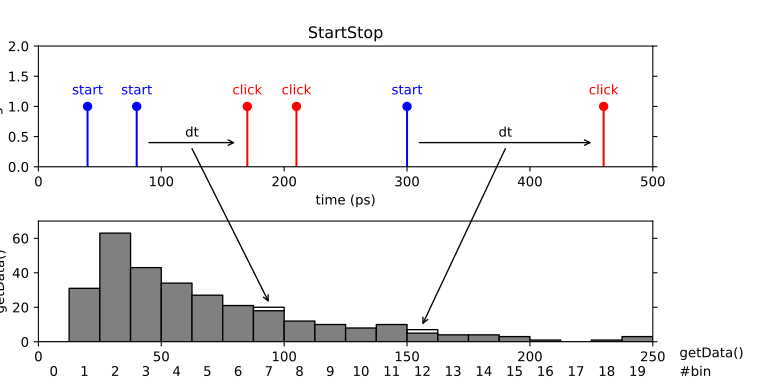
A simple start-stop measurement. This class performs a start-stop measurement between two channels and stores the time differences in a histogram. The histogram resolution is specified beforehand (binwidth) but the histogram range is unlimited. It is adapted to the largest time difference that was detected. Thus all pairs of subsequent clicks are registered. Only non-empty bins are recorded.
Public Functions
-
StartStop(TimeTaggerBase tagger, channel_t click_channel, channel_t start_channel = CHANNEL_UNUSED, timestamp_t binwidth = 1000)
- Parameters:
tagger – Time tagger object instance.
click_channel – Channel on which stop clicks are received.
start_channel – Channel on which start clicks are received (default: CHANNEL_UNUSED).
binwidth – Bin width in ps (default: 1000).
-
timestamp_t[,] getData()
- Returns:
An array of tuples (array of shape Nx2) containing the times (in ps) and counts of each bin. Only non-empty bins are returned.
-
StartStop(TimeTaggerBase tagger, channel_t click_channel, channel_t start_channel = CHANNEL_UNUSED, timestamp_t binwidth = 1000)
Histogram
-
class Histogram : public IteratorBase

Accumulate time differences into a histogram. This is a simple multiple start, multiple stop measurement. This is a special case of the more general
TimeDifferencesmeasurement. Specifically, the measurement waits for clicks on the start_channel, and for each start click, it measures the time difference between the start clicks and all subsequent clicks on the click_channel and stores them in a histogram. The histogram range and resolution are specified by the number of bins and the bin width specified in ps. Clicks that fall outside the histogram range are ignored. Data accumulation is performed independently for all start clicks. This type of measurement is frequently referred to as a ‘multiple start, multiple stop’ measurement and corresponds to a full auto- or cross-correlation measurement.Public Functions
-
Histogram(TimeTaggerBase tagger, channel_t click_channel, channel_t start_channel = CHANNEL_UNUSED, timestamp_t binwidth = 1000, int n_bins = 1000)
- Parameters:
tagger – Time tagger object instance.
click_channel – Channel on which clicks are received.
start_channel – Channel on which start clicks are received (default: CHANNEL_UNUSED).
binwidth – Bin width in ps (default: 1000).
n_bins – The number of bins in the histogram (default: 1000).
-
int[] getData()
- Returns:
A one-dimensional array of size n_bins containing the histogram.
-
timestamp_t[] getIndex()
- Returns:
A vector of size n_bins containing the time bins in ps.
-
Histogram(TimeTaggerBase tagger, channel_t click_channel, channel_t start_channel = CHANNEL_UNUSED, timestamp_t binwidth = 1000, int n_bins = 1000)
HistogramLogBins
-
class HistogramLogBins : public IteratorBase

The HistogramLogBins measurement is similar to
Histogrambut the bin edges are spaced logarithmically. As the bins do not have a homogeneous binwidth, a proper normalization is required to interpret the raw data.For excluding time ranges from the histogram evaluation while maintaining a proper normalization,
HistogramLogBinsoptionally takes two gating arguments of typeChannelGate. This can, e.g., be used to pause the acquisition during erroneous ranges that have to be identified by virtual channels. The same mechanism automatically applies to overflow ranges.The acquired histogram
 is normalized by with an estimation of counts
 and the click and start channel count rates,
  and
and  , respectively. Typically, this will be used to calculate For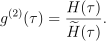
 and without interruptions,
  will approach the binwidth of the respective bin. During the early acquisition and in case of interruptions, can be significantly smaller, which compensates for counts that are excluded from
  .
.
Subclassed by HistogramCustomBins
Public Functions
-
HistogramLogBins(TimeTaggerBase tagger, channel_t click_channel, channel_t start_channel, float exp_start, float exp_stop, int n_bins, ChannelGate click_gate = None, ChannelGate start_gate = None)
- Parameters:
tagger – Time tagger object instance.
click_channel – Channel on which clicks are received.
start_channel – Channel on which start clicks are received.
exp_start – Exponent
10^exp_startin seconds where the very first bin begins.exp_stop – Exponent
10^exp_stopin seconds where the very last bin ends.n_bins – The number of bins in the histogram.
click_gate – Optional evaluation gate for the click_channel.
start_gate – Optional evaluation gate for the start_channel.
-
HistogramLogBinsData getDataObject()
- Returns:
A data object containing raw and normalization data.
-
timestamp_t[] getBinEdges()
- Returns:
A vector of size n_bins+1 containing the bin edges in picoseconds.
-
int[] getData()
- Deprecated:
Since version 2.17.0. Please use
getDataObject()andHistogramLogBinsData::getCounts()instead.
- Returns:
A one-dimensional array of size n_bins containing the histogram.
-
float[] getDataNormalizedCountsPerPs()
- Deprecated:
Since version 2.17.0.
- Returns:
The counts normalized by the binwidth of each bin.
-
float[] getDataNormalizedG2()
- Deprecated:
Since version 2.17.0. Please use
getDataObject()andHistogramLogBinsData::getG2()instead.
- Returns:
The counts normalized by the binwidth of each bin and the average count rate.
-
HistogramLogBins(TimeTaggerBase tagger, channel_t click_channel, channel_t start_channel, float exp_start, float exp_stop, int n_bins, ChannelGate click_gate = None, ChannelGate start_gate = None)
-
class HistogramLogBinsData
Contains the histogram counts
and the corresponding normalization function  .
. Public Functions
-
float[] getG2()
- Returns:
A one-dimensional array of size n_bins containing the normalized histogram
 .
.
-
int[] getCounts()
- Returns:
A one-dimensional array of size n_bins containing the raw histogram
.
-
float[] getG2Normalization()
- Returns:
A one-dimensional array of size n_bins containing the normalization
 .
.
Public Members
-
timestamp_t accumulation_time_start
Effective accumulation time of the start_channel in picosecond.
This is the total time during which the start_channel was open for evaluation, i.e., not excluded by start_gate. This is the time base used for the start_channel countrate in the normalization.
-
timestamp_t accumulation_time_click
Effective accumulation time of the click_channel in picosecond.
This is the total time during which the click_channel was open for evaluation, i.e., not excluded by click_gate. This is the time base used for the click_channel countrate in the normalization.
-
timestamp_t capture_duration
Total capture duration in picoseconds since the measurement creation or last call to
IteratorBase::clear()(equivalent toIteratorBase::getCaptureDuration()).Note
Unlike accumulation_time_start / accumulation_time_click, capture_duration is not reduced by channel gates. It represents the overall acquisition time base.
-
float[] getG2()
HistogramCustomBins
-
class HistogramCustomBins : public HistogramLogBins

HistogramCustomBins is an alternative to
HistogramLogBinsthat supports explicitly defined bin edges. LikeHistogramLogBins, it is optimized for applications with very large bins. Compared toHistogram, its performance is much better when the average bin width is much larger than the average period of the input events, and much worse otherwise.The primary use case for HistogramCustomBins is the analysis of data over extremely large correlation windows with manually defined bin edges, for example in correlation spectroscopy with pulsed laser excitation; see the Fluorescence Correlation Spectroscopy tutorial for details.
The measurement data can be retrieved in the same way as for
HistogramLogBins, using theHistogramLogBinsDataobject. For more information, seeHistogramLogBins.Note
This measurement and HistogramLogBins have a time complexity of
(start_rate + click_rate) * n_bins. So it is good to keep the amount of bins small, usually down to just a few hundred bins.Public Functions
-
HistogramCustomBins(TimeTaggerBase tagger, channel_t click_channel, channel_t start_channel, timestamp_t[] binedges, ChannelGate click_gate = None, ChannelGate start_gate = None)
- Parameters:
tagger – Time tagger object instance.
click_channel – Channel on which clicks are received.
start_channel – Channel on which start clicks are received.
binedges – The timestamps of the edges of the bins.
click_gate – Optional evaluation gate for the click_channel.
start_gate – Optional evaluation gate for the start_channel.
-
HistogramCustomBins(TimeTaggerBase tagger, channel_t click_channel, channel_t start_channel, timestamp_t[] binedges, ChannelGate click_gate = None, ChannelGate start_gate = None)
Histogram2D
-
class Histogram2D : public IteratorBase
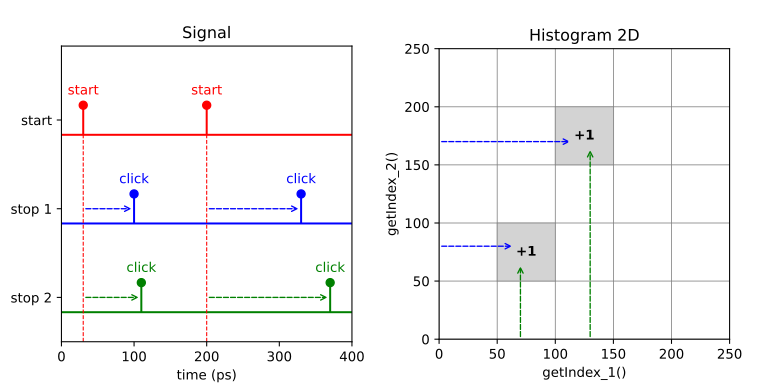
This measurement is a 2-dimensional version of the
Histogrammeasurement. The measurement accumulates two-dimensional histogram where stop signals from two separate channels define the bin coordinate. For instance, this kind of measurement is similar to that of typical 2D NMR spectroscopy. The data within the histogram is acquired via a single-start, single-stop analysis for each axis. The first stop click of each axis is taken after the start click to evaluate the histogram counts.Public Functions
-
Histogram2D(TimeTaggerBase tagger, channel_t start_channel, channel_t stop_channel_1, channel_t stop_channel_2, timestamp_t binwidth_1, timestamp_t binwidth_2, int n_bins_1, int n_bins_2)
- Parameters:
tagger – Time tagger object
start_channel – Channel on which start clicks are received
stop_channel_1 – Channel on which stop clicks for the time axis 1 are received
stop_channel_2 – Channel on which stop clicks for the time axis 2 are received
binwidth_1 – Bin width in ps for the time axis 1
binwidth_2 – Bin width in ps for the time axis 2
n_bins_1 – The number of bins along the time axis 1
n_bins_2 – The number of bins along the time axis 2
-
int[,] getData()
- Returns:
A two-dimensional array of size n_bins_1 by n_bins_2 containing the 2D histogram.
-
timestamp_t[,,] getIndex()
Returns a 3D array containing two coordinate matrices (meshgrid) for time bins in ps for the time axes 1 and 2. For details on meshgrid please take a look at the respective documentation either for Matlab or Python NumPy.
- Returns:
A three-dimensional array of size n_bins_1 x n_bins_2 x 2.
-
timestamp_t[] getIndex_1()
- Returns:
A vector of size n_bins_1 containing the bin locations in ps for the time axis 1.
-
timestamp_t[] getIndex_2()
- Returns:
A vector of size n_bins_2 containing the bin locations in ps for the time axis 2.
-
Histogram2D(TimeTaggerBase tagger, channel_t start_channel, channel_t stop_channel_1, channel_t stop_channel_2, timestamp_t binwidth_1, timestamp_t binwidth_2, int n_bins_1, int n_bins_2)
HistogramND
-
class HistogramND : public IteratorBase
This measurement is the generalization of
Histogram2Dto an arbitrary number of dimensions. The data within the histogram is acquired via a single-start, single-stop analysis for each axis. The first stop click of each axis is taken after the start click to evaluate the histogram counts.HistogramNDcan be used as a 1DHistogramwith single-start single-stop behavior.Public Functions
-
HistogramND(TimeTaggerBase tagger, channel_t start_channel, channel_t[] stop_channels, timestamp_t[] binwidths, int[] n_bins)
- Parameters:
tagger – Time tagger object.
start_channel – Channel on which start clicks are received.
stop_channels – Channel list on which stop clicks are received defining the time axes.
binwidths – Bin width in ps for the corresponding time axis.
n_bins – The number of bins along the corresponding time axis.
-
int[] getData()
Returns a one-dimensional array of the size of the product of n_bins containing the histogram data. The array order is in row-major. For example, with
stop_channels=[ch1, ch2]andn_bins=[2, 2], the 1D array would represent 2D bin indices in the order[(0,0), (0,1), (1,0), (1,1)], with (index ofch1, index ofch2). Please reshape the 1D array to get the N-dimensional array. The following code demonstrates how to reshape the returned 1D array into multidimensional array using NumPy:channels = [2, 3, 4, 5] n_bins = [5, 3, 4, 6] binwidths = [100, 100, 100, 50] histogram_nd = HistogramND(tagger, 1, channels, binwidths, n_bins) sleep(1) # Wait to accumulate the data data = histogram_nd.getData() multidim_array = numpy.reshape(data, n_bins)
- Returns:
Flattened array of histogram bins.
-
timestamp_t[] getIndex(int dim = 0)
- Returns:
A vector of size n_bins[dim] containing the bin locations in ps for the corresponding time axis.
-
HistogramND(TimeTaggerBase tagger, channel_t start_channel, channel_t[] stop_channels, timestamp_t[] binwidths, int[] n_bins)
Correlation
-
class Correlation : public IteratorBase
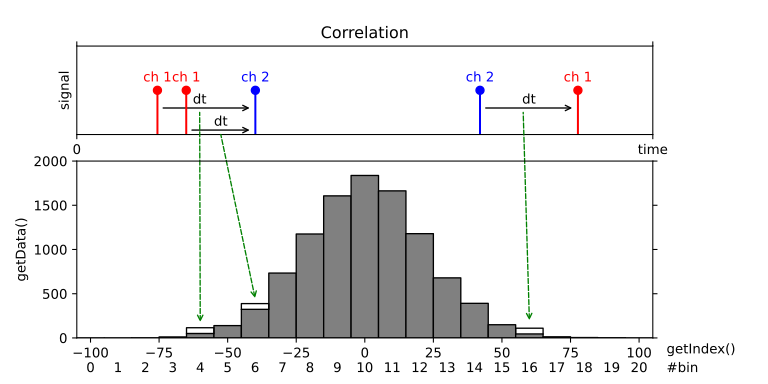
Accumulates time differences between clicks on two channels into a histogram, where all clicks are considered both as “start” and “stop” clicks and both positive and negative time differences are calculated.
Note
To perform multiple cross-correlations between any pairs within a set of channels,
CorrelationPairsmight offer a better performance.Public Functions
-
Correlation(TimeTaggerBase tagger, channel_t channel_1, channel_t channel_2 = CHANNEL_UNUSED, timestamp_t binwidth = 1000, int n_bins = 1000)
- Parameters:
tagger – Time tagger object.
channel_1 – Channel on which (stop) clicks are received.
channel_2 – Channel on which reference clicks (start) are received (when left empty or set to CHANNEL_UNUSED -> an auto-correlation measurement is performed, which is the same as setting
channel_1 = channel_2) (default: CHANNEL_UNUSED).binwidth – Bin width in ps (default: 1000).
n_bins – The number of bins in the resulting histogram (default: 1000).
-
int[] getData()
- Returns:
A one-dimensional array of size n_bins containing the histogram.
-
float[] getDataNormalized()
Return the data normalized as:
where
 is the capture duration,
  and
and  are number of events in each channel.
Warning
This normalization assumes that the histogram span is much smaller than the measurement duration. For large delay ranges, reduced overlap at large absolute delays is not taken into account. In such cases, use
HistogramLogBinsorHistogramCustomBinsandHistogramLogBinsData::getG2Normalization().- Returns:
Data normalized by the binwidth and the average count rate.
-
timestamp_t[] getIndex()
- Returns:
A vector of size n_bins containing the time bins in ps.
-
Correlation(TimeTaggerBase tagger, channel_t channel_1, channel_t channel_2 = CHANNEL_UNUSED, timestamp_t binwidth = 1000, int n_bins = 1000)
CorrelationPairs
-
class CorrelationPairs : public IteratorBase
Accumulates time differences between clicks on any pair of channels into a histogram, where all clicks are considered both as “start” and “stop” clicks and both positive and negative time differences are calculated.
Public Functions
-
CorrelationPairs(TimeTaggerBase tagger, channel_t[] channels, timestamp_t binwidth = 1000, int n_bins = 1000)
- Parameters:
tagger – Time tagger object.
channels – List of channels on which reference (start) events and (stop) clicks are received.
binwidth – Bin width in ps (default: 1000).
n_bins – The number of bins in the resulting histogram per pair of channels (default: 1000).
-
CorrelationPairsData getDataObject()
Returns a
CorrelationPairsDataobject containing a snapshot of the data accumulated in theCorrelationPairsat the time this method is called.- Returns:
An object providing access to a snapshot data.
-
timestamp_t[] getIndex()
- Returns:
A vector of size n_bins containing the time bins in ps.
-
CorrelationPairs(TimeTaggerBase tagger, channel_t[] channels, timestamp_t binwidth = 1000, int n_bins = 1000)
-
class CorrelationPairsData
Public Functions
-
int[,,] getCounts(bool exclude_self_coincidences = true)
- Parameters:
exclude_self_coincidences – Controls if autocorrelation histograms (i == j) exclude same-event pairs (a timestamp correlated with itself), removing the
 -like spike at
  = 0 (default: True).
 - Returns:
A three-dimensional array of size n_channels x n_channels x n_bins containing the histogram, where n_channels is the total number of channels:
The first index selects the start channel.
The second index selects the stop channel.
The third index runs over the histogram bins.
-
float[,,] getG2(bool exclude_self_coincidences = true)
Return the data normalized as:
where is the capture duration, and are number of events in each channel.
Warning
This normalization assumes that the histogram span is much smaller than the measurement duration. For large delay ranges, the reduced overlap at large absolute delays is not taken into account.
- Parameters:
exclude_self_coincidences – Controls if autocorrelation histograms (i == j) exclude same-event pairs (a timestamp correlated with itself), removing the
-like spike at = 0 (default: True). - Returns:
A three-dimensional array of size n_channels x n_channels x n_bins containing the data normalized by the binwidth and the average count rate, where n_channels is the total number of channels:
The first index selects the start channel.
The second index selects the stop channel.
The third index runs over the histogram bins.
-
timestamp_t[] getIndex()
- Returns:
A vector of size n_bins containing the time bins in ps.
-
int[,,] getCounts(bool exclude_self_coincidences = true)
TimeDifferences
-
class TimeDifferences : public IteratorBase
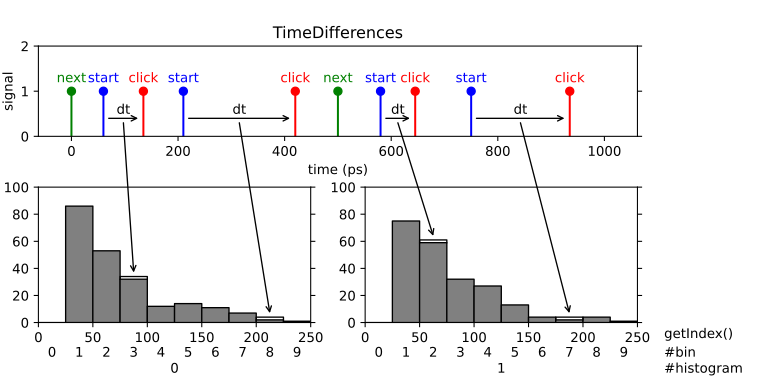
A one-dimensional array of time-difference histograms with the option to include up to two additional channels that control how to step through the indices of the histogram array. This is a very powerful and generic measurement. You can use it to record consecutive cross-correlation, lifetime measurements, fluorescence lifetime imaging and many more measurements based on pulsed excitation. Specifically, the measurement waits for a tag on the start_channel, then measures the time difference between the start tag and all subsequent tags on the click_channel and stores them in a histogram. If no start_channel is specified, the click_channel is used as start_channel corresponding to an auto-correlation measurement. The histogram has a number n_bins of bins of bin width binwidth. Clicks that fall outside the histogram range are discarded. Data accumulation is performed independently for all start tags. This type of measurement is frequently referred to as ‘multiple start, multiple stop’ measurement and corresponds to a full auto- or cross-correlation measurement.
The time-difference data can be accumulated into a single histogram or into multiple subsequent histograms. In this way, you can record a sequence of time-difference histograms. To switch from one histogram to the next one you have to specify a channel that provide switch markers (next_channel parameter). Also you need to specify the number of histograms with the parameter n_histograms. After each tag on the next_channel, the histogram index is incremented by one and reset to zero after reaching the last valid index. The measurement starts with the first tag on the next_channel.
You can also provide a synchronization marker that resets the histogram index by specifying a sync_channel. The measurement starts when a tag on the sync_channel arrives with a subsequent tag on next_channel. When a rollover occurs, the accumulation is stopped until the next sync and subsequent next signal. A sync signal before a rollover will stop the accumulation, reset the histogram index and a subsequent signal on the next_channel starts the accumulation again.
Typically, you will run the measurement indefinitely until stopped by the user. However, it is also possible to specify the maximum number of rollovers of the histogram index. In this case, the measurement stops when the number of rollovers has reached the specified value.
Public Functions
-
TimeDifferences(TimeTaggerBase tagger, channel_t click_channel, channel_t start_channel = CHANNEL_UNUSED, channel_t next_channel = CHANNEL_UNUSED, channel_t sync_channel = CHANNEL_UNUSED, timestamp_t binwidth = 1000, int n_bins = 1000, int n_histograms = 1)
Note
A rollover occurs on a next_channel event while the histogram index is already in the last histogram. If sync_channel is defined, the measurement will pause at a rollover until a sync_channel event occurs and continues at the next next_channel event. With undefined sync_channel, the measurement will continue without interruption at histogram index 0.
- Parameters:
tagger – Time tagger object instance.
click_channel – Channel on which stop clicks are received.
start_channel – Channel that sets start times relative to which clicks on the click channel are measured.
next_channel – Channel that increments the histogram index.
sync_channel – Channel that resets the histogram index to zero.
binwidth – Binwidth in picoseconds.
n_bins – Number of bins in each histogram.
n_histograms – Number of histograms.
-
int[,] getData()
- Returns:
A two-dimensional array of size n_histograms by n_bins containing the histograms in row-major format.
-
timestamp_t[] getIndex()
- Returns:
A vector of size n_bins containing the time bins in ps.
-
void setMaxCounts(int max_counts)
- Deprecated:
Please use
setMaxRollovers()instead. Sets the number of rollovers at which the measurement stops integrating. To integrate infinitely, set the value to 0, which is the default value.
- Parameters:
max_counts – Maximum number of sync/next clicks.
-
void setMaxRollovers(int max_rollovers)
Sets the number of rollovers at which the measurement stops. To integrate infinitely, set the value to 0, which is the default value.
- Parameters:
max_rollovers – Maximum number of rollovers (histogram index resets).
-
int getHistogramIndex()
- Returns:
The index of the currently processed histogram or the waiting state. Possible return values are:
-2: Waiting for an event on sync_channel (only if sync_channel is defined)
-1: Waiting for an event on next_channel (only if sync_channel is defined)
0 … (n_histograms - 1): Index of the currently processed histogram.
-
int getCounts()
- Returns:
The number of rollovers (histogram index resets).
-
bool ready()
- Returns:
True when the required number of rollovers set by
setMaxCounts()has been reached.
-
TimeDifferences(TimeTaggerBase tagger, channel_t click_channel, channel_t start_channel = CHANNEL_UNUSED, channel_t next_channel = CHANNEL_UNUSED, channel_t sync_channel = CHANNEL_UNUSED, timestamp_t binwidth = 1000, int n_bins = 1000, int n_histograms = 1)
TimeDifferencesND
-
class TimeDifferencesND : public IteratorBase

This is an implementation of the
TimeDifferencesmeasurement class that extends histogram indexing into multiple dimensions. Please read the documentation ofTimeDifferencesfirst.It captures many multiple start - multiple stop histograms, but with many asynchronous next_channel triggers. After each tag on each next_channel, the histogram index of the associated dimension is incremented by one and reset to zero after reaching the last valid index. The elements of the parameter n_histograms specify the number of histograms per dimension. The accumulation starts when next_channel has been triggered on all dimensions.
You should provide a synchronization trigger by specifying a sync_channel per dimension. It will stop the accumulation when an associated histogram index rollover occurs. A sync event will also stop the accumulation and reset the histogram index of the associated dimension. A subsequent event on the corresponding next_channel will start the accumulation again. The synchronization is done asynchronously, so an event on the next_channel increments the histogram index even if the accumulation is stopped. The accumulation will start when a tag on the sync_channel arrives with a subsequent tag on next_channel for all dimensions.
Please use
TimeTaggerBase::setInputDelay()to adjust the latency of all channels. In general, the order of the provided triggers including maximum jitter should be:old start trigger -> all sync triggers -> all next triggers -> new start trigger.
Public Functions
-
TimeDifferencesND(TimeTaggerBase tagger, channel_t click_channel, channel_t start_channel, channel_t[] next_channels, channel_t[] sync_channels, int[] n_histograms, timestamp_t binwidth, int n_bins)
- Parameters:
tagger – Time tagger object instance.
click_channel – Channel on which stop clicks are received.
start_channel – Channel that sets start times relative to which clicks on the click channel are measured.
next_channels – Vector of channels that increments the histogram index.
sync_channels – Vector of channels that resets the histogram index to zero.
n_histograms – Vector of numbers of histograms per dimension.
binwidth – Width of one histogram bin in ps.
n_bins – Number of bins in each histogram.
-
int[,] getData()
- Returns:
A two-dimensional array of size M by n_bins containing the histograms in row-major format, where M is the total number of histograms, calculated as the product of all elements in n_histograms. The histograms are indexed according to the multidimensional shape defined by n_histograms, with each row representing a unique combination of histogram trigger indices. The ordering of histograms in the output is based on the standard left-to-right index mapping (
std::layout_left), with the leftmost index inn_histogramschanging most frequently when counting through the histograms. The position of each histogram is computed as a linear offset using strides that increase from left to right.
-
timestamp_t[] getIndex()
- Returns:
A vector of size n_bins containing the time bins in ps.
-
void setMaxRollovers(int[] max_rollovers)
Sets the maximum number of rollovers per direction at which the measurement stops. It stops after the first maximum is met. To integrate infinitely, set the value to 0, which is the default value.
- Parameters:
max_rollovers – Maximum number of rollovers (histogram index resets).
-
int[] getHistogramIndex()
- Returns:
The indices of the currently processed histogram or the waiting state. Possible return values are:
-2: Waiting for an event on sync_channel (only if sync_channel is defined)
-1: Waiting for an event on next_channel (only if sync_channel is defined)
0 … (n_histograms - 1): Index of the currently processed histogram.
-
int[] getRollovers()
- Returns:
The number of rollovers (histogram index resets).
-
TimeDifferencesND(TimeTaggerBase tagger, channel_t click_channel, channel_t start_channel, channel_t[] next_channels, channel_t[] sync_channels, int[] n_histograms, timestamp_t binwidth, int n_bins)