Time-tag streaming
Measurement classes described in this section provide direct access to the time tag stream with minimal or no pre-processing.
Time tag format
The time tag contain essential information about the detected event and have the following format:
Size |
Type |
Description |
|---|---|---|
8 bit |
enum |
overflow type |
8 bit |
– |
reserved |
16 bit |
uint16 |
number of missed events |
32 bit |
int32 |
channel number |
64 bit |
int64 |
time in ps from device start-up |
FileWriter
-
class FileWriter : public IteratorBase
Writes the time-tag-stream into a file in a structured binary format with a lossless compression. The estimated file size requirements are 2-4 Bytes per time tag, not including the container the data is stored in. The continuous background data rate for the container can be modified via
TimeTagger::setStreamBlockSize(). Data is processed in blocks and each block header has a size of 160 Bytes. The default processing latency is 20 ms, which means that a block is written every 20 ms resulting in a background data rate of 8 kB/s. By increasing the processing latency viaTimeTagger::setStreamBlockSize(max_events=524288, max_latency=1000)to 1 s, the resulting data rate for the container is reduced to one 160 B/s. The files created withFileWritermeasurement can be read usingFileReaderor loaded into the Virtual Time Tagger.The
FileWriteris able to split the data into multiple files seamlessly when the file size reaches a maximal size. For the file splitting to work properly, the filename specified by the user will be extended with a suffix containing sequential counter, so the filenames will look like in the following example:fw = FileWriter(tagger, 'filename.ttbin', [1,2,3]) # Store tags from channels 1,2,3 # When splitting occurs the files with following names will be created # filename.ttbin # the sequence header file with no data blocks # filename.1.ttbin # the first file with data block # filename.2.ttbin # filename.3.ttbin # ...
In addition, the
FileWriterwill query and store the configuration of the Time Tagger in the same format as returned by theTimeTaggerBase::getConfiguration()method. The configuration is always written into every file.See also: FileReader , The TimeTaggerVirtual class , and mergeStreamFiles.
Note
You can use the
Dumpfor dumping into a simple uncompressed binary format. However, you will not be able to use this file with Virtual Time Tagger orFileReader.Public Functions
-
FileWriter(TimeTaggerBase tagger, str filename, channel_t[] channels)
Class constructor. As with all other measurements, the data recording starts immediately after the class instantiation unless you initialize the
FileWriterwith aSynchronizedMeasurements.Note
Compared to the
Dumpmeasurement, theFileWriterrequires explicit specification of the channels. If you want to store timetags from all input channels, you can query the list of all input channels withTimeTagger::getChannelList().- Parameters:
tagger – The time tagger object.
filename – Name of the output file.
channels – List of real or virtual channels.
-
void split(str new_filename = "")
Close the current file and create a new one. If the new_filename is provided, the data writing will continue into the file with the new filename and the sequence counter will be reset to zero.
You can force the file splitting when you call this method without parameter or when the new_filename is an empty string.
- Parameters:
new_filename – Filename of the new file. If empty, the old one will be used (default: empty).
-
void setMaxFileSize(int max_file_size)
Set the maximum file size on disk. When this size is exceeded a new file will be automatically created to continue recording.
The actual file size might be larger by one block.
- Parameters:
max_file_size – Maximum file size in bytes (default: ~1 GByte).
-
int getMaxFileSize()
- Returns:
The maximal file size in bytes. See also
setMaxFileSize().
-
int getTotalEvents()
- Returns:
The total number of events written into the file(s).
-
int getTotalSize()
- Returns:
The total number of bytes written into the file(s).
-
void setMarker(str marker)
Writes a comment into the file. While reading the file using the
FileReader, the last marker can be extracted.- Parameters:
marker – An arbitrary marker string to write at the current location in the file.
-
FileWriter(TimeTaggerBase tagger, str filename, channel_t[] channels)
FileReader
-
class FileReader
This class allows you to read data files store with
FileReader. TheFileReaderreads a data block of the specified size into aTimeTagStreamBufferobject and returns this object. The returned data object is exactly the same as returned by theTimeTagStreammeasurement and allows you to create a custom data processing algorithms that will work both, for reading from a file and for the on-the-fly processing.The
FileReaderwill automatically recognize if the files were split and read them too one by one.Example:
# Lets assume we have following files created with the FileWriter
#  measurement.ttbin     # sequence header file with no data blocks
#  measurement.1.ttbin   # the first file with data blocks
#  measurement.2.ttbin
#  measurement.3.ttbin
#  measurement.4.ttbin
#  another_meas.ttbin
#  another_meas.1.ttbin

# Read all files in the sequence 'measurement'
fr = FileReader("measurement.ttbin")

# Read only the first data file
fr = FileReader("measurement.1.ttbin")

# Read only the first two files
fr = FileReader(["measurement.1.ttbin", "measurement.2.ttbin"])

# Read the sequence 'measurement' and then the sequence 'another_meas'
fr = FileReader(["measurement.ttbin", "another_meas.ttbin"])
See also: FileWriter , The TimeTaggerVirtual class , and mergeStreamFiles.
Public Functions
-
FileReader(str[] filenames)
This is the class constructor. The
FileReaderautomatically continues to read files that were split by theFileWriter.- Parameters:
filenames – Filename(s) of the files to read.
-
TimeTagStreamBuffer getData(int n_events)
Reads the next n_events and returns the buffer object with the specified number of timetags. The FileReader stores the current location in the data file and guarantees that every timetag is returned once. If less than n_elements are returned, the reader has reached the end of the last file in the file-list filenames. To check if more data is available for reading, it is more convenient to use
hasData().- Parameters:
n_events – Number of timetags to read from the file.
- Returns:
A buffer of size n_events.
-
bool hasData()
- Returns:
Trueif more data is available for reading,Falseif all data has been read from all the files specified in the class constructor.
-
str getConfiguration()
- Returns:
A JSON formatted string (
dictin Python) that contains the Time Tagger configuration at the time of file creation.
-
str getLastMarker()
- Returns:
The last processed marker from the file (see also
FileWriter::setMarker()).
-
FileReader(str[] filenames)
Dump
-
class Dump : public IteratorBase
Writes the timetag stream into a file in a simple uncompressed binary format that store timetags as 128bit records, see Time tag format .
Warning
The files created with this class are not readable by
TimeTaggerVirtualandFileReader. For storing time tag data intended for re-reading or postprocessing, use theFileWritermeasurement class instead.Public Functions
-
Dump(TimeTaggerBase tagger, str filename, int max_tags, channel_t[] channels = channel_t[]())
- Parameters:
tagger – Time Tagger object instance.
filename – Name of the output file.
max_tags – Stop after this number of tags has been dumped. Negative values will dump forever.
channels – List of channels which are dumped to the file (when empty or not passed all active channels are dumped).
-
Dump(TimeTaggerBase tagger, str filename, int max_tags, channel_t[] channels = channel_t[]())
Scope
-
class Scope : public IteratorBase
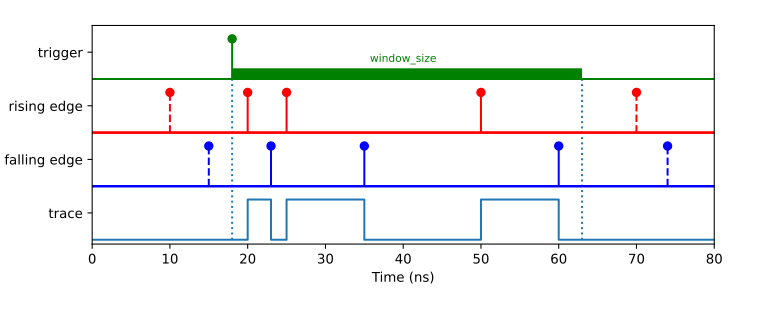
The
Scopeclass allows to visualize time tags for rising and falling edges in a time trace diagram similarly to an ultrafast logic analyzer. The trace recording is synchronized to a trigger signal which can be any physical or virtual channel. However, only physical channels can be specified to the event_channels parameter. Additionally, one has to specify the time window_size which is the timetrace duration to be recorded, the number of traces to be recorded and the maximum number of events to be detected. Ifn_traces < 1then retriggering will occur infinitely, which is similar to the “normal” mode of an oscilloscope.Note
Scope class implicitly enables the detection of positive and negative edges for every physical channel specified in event_channels. This accordingly doubles the data rate requirement per input.
Public Functions
-
Scope(TimeTaggerBase tagger, channel_t[] event_channels, channel_t trigger_channel, timestamp_t window_size = 1000000000, int n_traces = 1, int n_max_events = 1000)
- Parameters:
tagger – The time tagger object instance.
event_channels – List of channels.
trigger_channel – Channel number of the trigger signal.
window_size – Time window in picoseconds (default: 1 ms).
n_traces – Number of trigger events to be detected (default: 1).
n_max_events – Max number of events to be detected (default: 1000).
-
Event[][] getData()
Returns a tuple of the size equal to the number of event_channels multiplied by n_traces, where each element is a tuple of
Event.- Returns:
Event list for each trace.
-
bool ready()
- Returns:
Returns whether the acquisition is complete which means that all traces (n_traces) are acquired.
-
int triggered()
- Returns:
Returns number of trigger events have been captured so far.
-
timestamp_t getWindowSize()
- Returns:
Returns the windows_size parameter.
-
Scope(TimeTaggerBase tagger, channel_t[] event_channels, channel_t trigger_channel, timestamp_t window_size = 1000000000, int n_traces = 1, int n_max_events = 1000)
-
struct Event
Pair of the timestamp and the new state returned by
Scope::getData().
Sampler
-
class Sampler : public IteratorBase

The
Samplerclass allows sampling the state of a set of channels via a trigger channel.For every event on the trigger input, the current state (low: 0, high: 1, unknown: 2) will be written to an internal buffer. Fetching the data of the internal buffer will clear its internal buffer, so every event will be returned only once.
Time Tagger detects pulse edges and therefore a channel will be in the unknown state until an edge detection event was received on that channel from the start of the measurement or after an overflow. The internal processing assumes that no event could be received within the channel’s deadtime otherwise invalid data will be reported until the next event on this input channel.
Note
The maximum number of channels is limited to 63 for one
Samplerinstance.Public Functions
-
Sampler(TimeTaggerBase tagger, channel_t trigger, channel_t[] channels, int max_triggers)
- Parameters:
tagger – The time tagger object instance.
trigger – Channel number of the trigger signal.
channels – List of channels to be sampled.
max_triggers – The number of triggers and their respective sampled data, which is stored within the measurement class.
-
timestamp_t[,] getData()
Returns and removes the stored data as a 2D array (n_triggers x (n_channels + 1)):
[timestamp of first trigger,  state of channel 0, state of channel 1, ...],
[timestamp of second trigger, state of channel 0, state of channel 1, ...],
...
Where the state means:
0 -- low
1 -- high
2 -- undefined (after overflow)
- Returns:
Sampled data
-
timestamp_t[,] getDataAsMask()
Returns and removes the stored data as a 2D array (n_triggers x 2):
[timestamp of first trigger,  (state of channel 0) << 0 | (state of channel 1) << 1 | ... | any_undefined << 63],
[timestamp of second trigger, (state of channel 0) << 0 | (state of channel 1) << 1 | ... | any_undefined << 63],
...
Where state means:
0 -- low or undefined (after overflow)
1 -- high
If the highest bit (data[63]) is marked, one of the channels has been in an undefined state.
- Returns:
Sampled data.
-
Sampler(TimeTaggerBase tagger, channel_t trigger, channel_t[] channels, int max_triggers)